Google Reader Optimized Keyboard.
· 12:26 PM · 5 comments
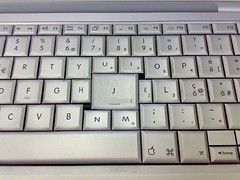
Image created by Flickr user, paolovalde
Lovely. Though I feel a little sorry for "k."
For those who don't know, pressing "j" moves to the next item to read in Google Reader.
· 12:26 PM · 5 comments
From the archive: 5 comments
Comments are closed. These were left by readers when the post was new.
Derek 1:26 PM
Nice. Also useful for Mutt, Gmail, w3m, vi, ...
Perhaps Art Lebedev will finally gives us the OLED keyboard with dynamically resizing keys based on frequency of use we've all been longing for. :-/
yahooza 1:29 PM
the best feature of GReader! j, j, j, oops, k, hmm, interesting, ok, j, j, j .... (repeat)
Artem Marchenko 2:15 PM
I actually use K button more often :)
Zac 2:23 PM
But, but, but ... you can just use the space bar. I guess most "ergonomic" keyboards are already optimized for that.
Pedro Leite 7:27 PM
I don't feel sorry for 'k', instead I just use 'k' more than 'j' to read in a chronological order ;)